
Live issue widget
One snippet, and feedback comes straight from the page.
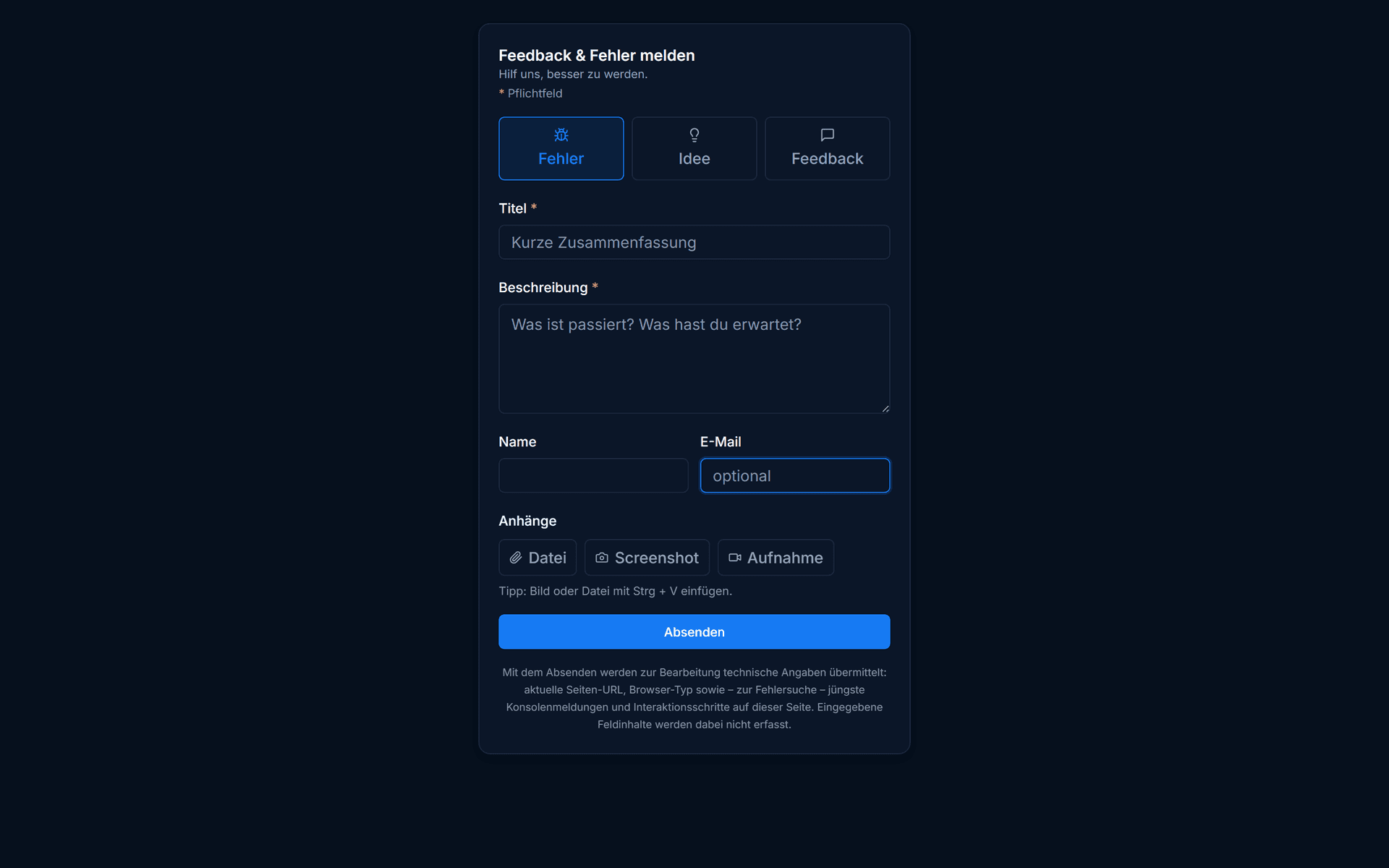
Visitors and colleagues report bugs and ideas right where they happen: with an annotated screenshot and automatically captured technical data. Every report lands in your inbox, ready to triage. Part of the Pro plan, GDPR-compliant and hosted on servers in Germany.
Three fields · up and running in 15 minutes · then the free plan continues automatically
- Servers in Germany
- GDPR-compliant
- Built in Germany
In three steps
From report to task.
Embed the snippet
Copy a single line into your website and set your widget ID. No rebuild, no extra library.
Let them report
Visitors or colleagues describe the problem, annotate the screenshot and send it off.
Triage in the inbox
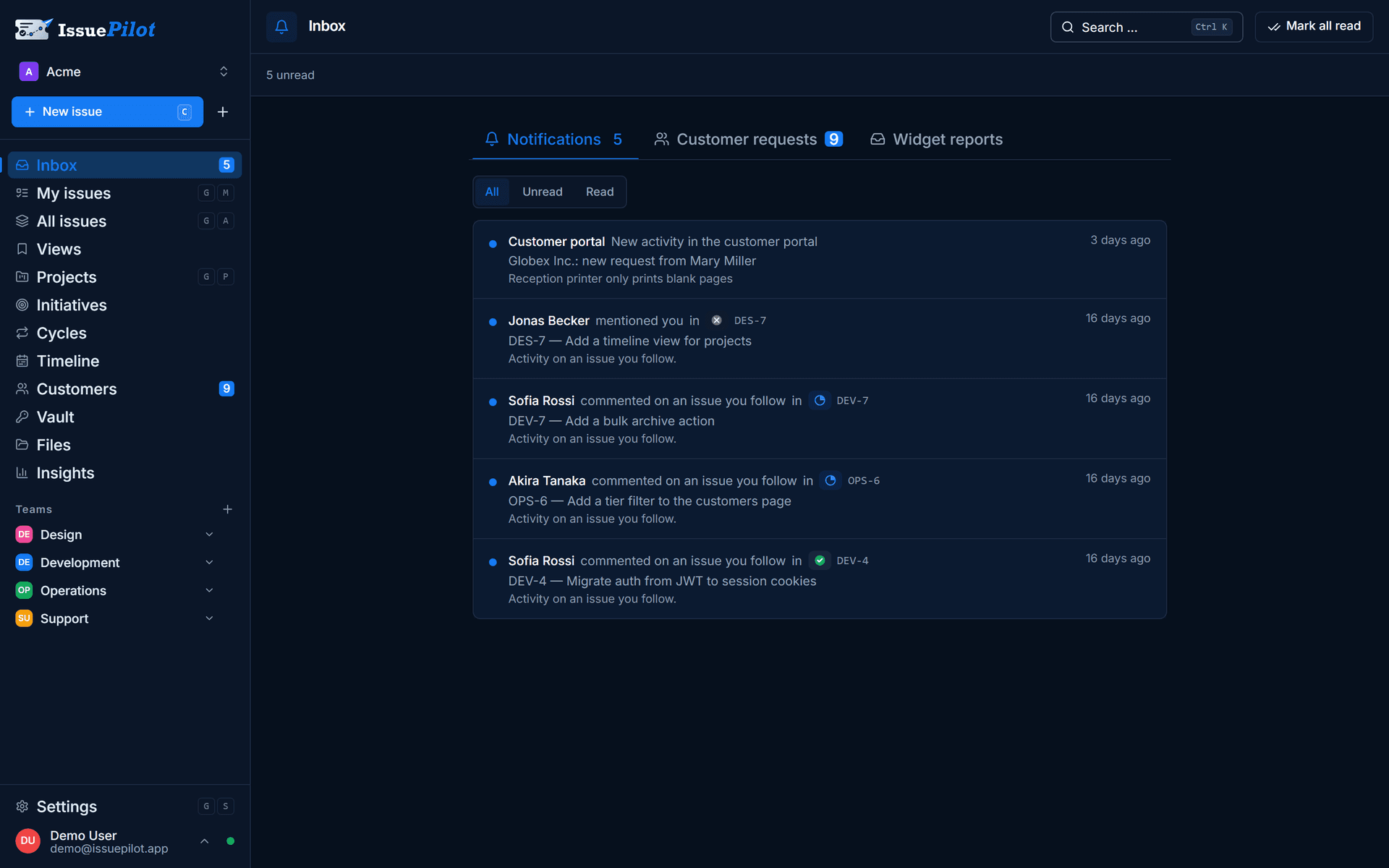
The report lands in your inbox, gets reviewed, prioritised and assigned as a task.
Embed
A single line on your page.
You copy the snippet, set your widget ID, and the widget appears. It loads asynchronously and won't slow your page down.
- Works on any website
- Loads asynchronously in the background
- Can be served under your own (sub)domain
No credit card required · Widget in the Pro plan
<script
  src="https://cockpit.issuepilot.app/widget.js"
  data-widget-id="YOUR_WIDGET_ID"
  data-position="bottom-right"
  async
></script>
Example snippet – you'll get your real widget ID in your workspace.
automatisch erfasst
Browser
Chrome 126
System
Windows 11
Viewport
1440 × 900
Konsole
2 Fehler
Annotate
Show it instead of describing it at length.
When a report is made, a screenshot of the page is captured. Reporters mark up exactly what they mean right on it, rather than putting it into words.
Arrow
Point to the exact spot that matters.
Rectangle
Frame and highlight areas.
Pen
Mark up and sketch freely.
Zoom
Zoom into the details of the page.
Ctrl + VPaste your own image from the clipboard.
Included automatically
You don't have to ask for the technical context.
With every report, the widget captures the conditions it was made under. That saves the usual follow-up question: “Which browser was that in?”
Browser
Name and version, e.g. Chrome 126.
System & viewport
Operating system and window size like 1440 × 900.
Console
JavaScript errors from the browser console.
Context
The page visited and the time of the report.
What teams use it for
Three situations where it pays off right away.
Internal QA
Your team tests a release on the staging site. Instead of collecting bugs in a spreadsheet, everyone reports right there on the spot, complete with an annotated screenshot and console errors.
Customer feedback
Customers report what's not working directly on your live website. With an email address or customer number, the report lands in your inbox already attributed, without back-and-forth over support.
Agency sign-off
The client reviews the finished website and marks change requests directly on the page. “Something's off in the top right” turns into a concrete task with a screenshot.
After that
Every report lands in your inbox.
Widget reports appear in the inbox with description, screenshot, technical data and optional extra fields. From there you review them, assign them to a project and hand them off.
- Description, screenshot and technical data in one report
- Optional email, user ID or customer number for attribution
- Tagged as a bug, idea or question
Data protection
GDPR-compliant, under your control.
GDPR-compliant
No third-party trackers in the widget. Only what’s needed for the report is captured. Extra data such as email, user ID or customer number is something you share deliberately — it’s never required.
Servers in Germany
Reports and screenshots come together on servers in Germany, not in a US cloud. For client projects with sensitive data, that’s often the condition for being allowed to start at all.
Your own domain
The widget can be served under your own (sub)domain, for example feedback.your-website.com. That keeps the experience yours, not tied to a third-party address.
FAQ
Questions about the widget.
You copy a short snippet into your website and set your widget ID. No rebuild, no extra library. If you like, it can be served under your own (sub)domain.
Collect feedback where it happens.
Set up your first widget — part of Pro, GDPR-compliant and hosted on servers in Germany.
Three fields · No credit card · Cancel monthly
- Servers in Germany
- GDPR-compliant
- Built in Germany
Still got a question? Write it down