
Mission control for tasks, bugs & feedback
Your team's tasks. Your customers' reports. One tool.
Issue tracking with a customer feedback channel built in.
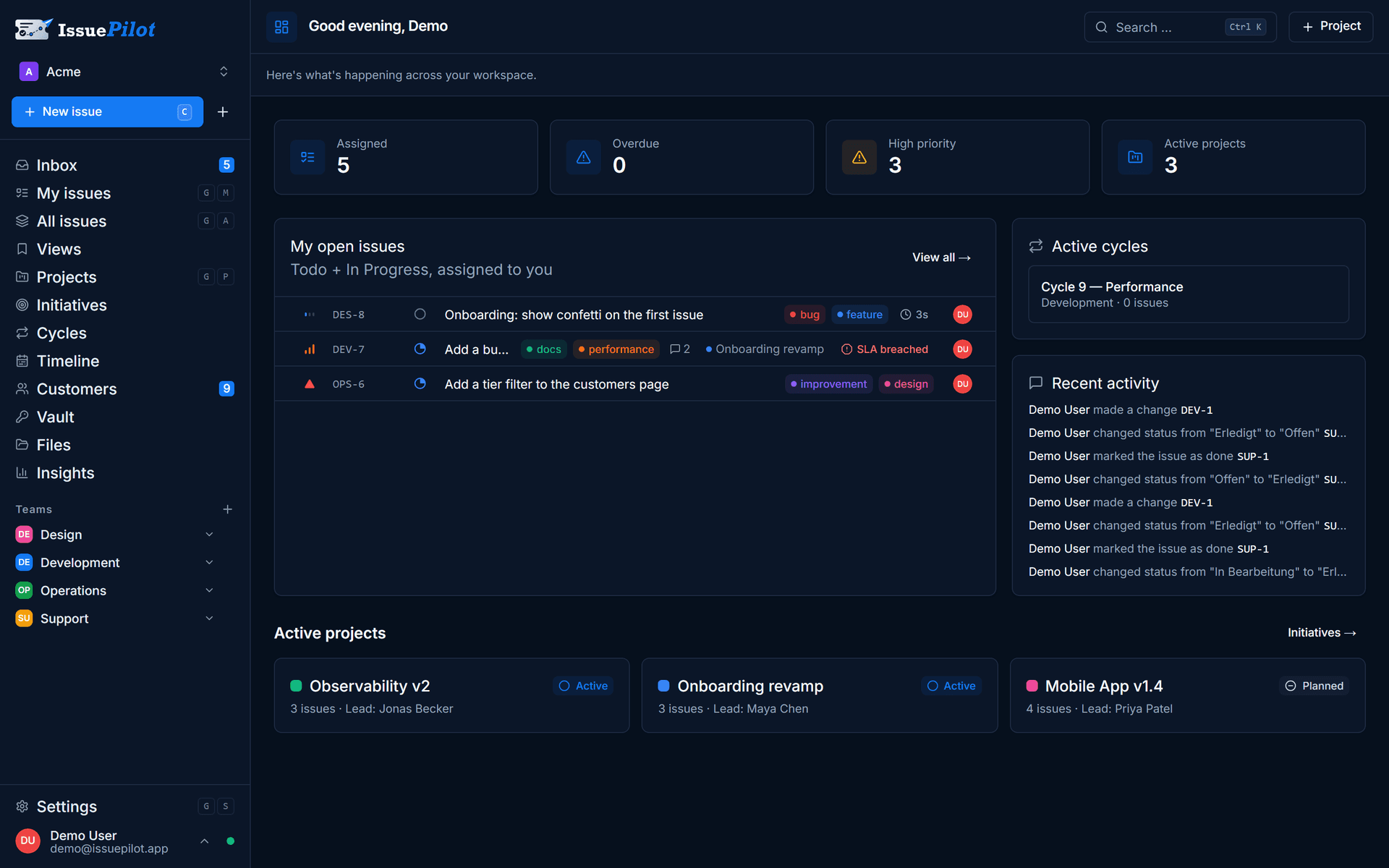
IssuePilot combines issue tracking, task management and a feedback widget in a single tool. Capture reports from the widget, email or a meeting in one place, prioritise them in the inbox, and work through them on a board or in a list — instead of piecing them together from five different channels.
30 days of Pro, free — every feature, no credit card.Three fields · Ready in 15 minutes · Then continues automatically on the free plan
- Servers in Germany
- GDPR-compliant
- Built in Germany
The problem
Feedback gets lost between channels.
A bug comes in by email, a customer sends a screenshot in chat, the rest is discussed in a meeting. In the end, nobody is quite sure what's still open or who owns it. Work stalls even though it was already reported.
Email inbox
scattered
Chat message
scattered
Meeting note
scattered
Screenshot somewhere
scattered
How it works with IssuePilot
Every report takes the same path.
First the inbox, then priority, ownership and delivery. Because the flow is always the same, you can see at any moment where a task stands and what comes next.
Capture
Inbox & widget
Prioritise
Triage
Assign
Assignees
Deliver
Board & cycle
Done
Completed
Tasks & boards
Every task carries its own context.
Status, priority, assignee, comments, attachments and subtasks all live on the task itself. Plan on the board or work through the list, and change key fields right in the row without opening the task.
- Board for planning, list for fast execution
- Change status and priority inline in the row
- Comments and attachments right on the item
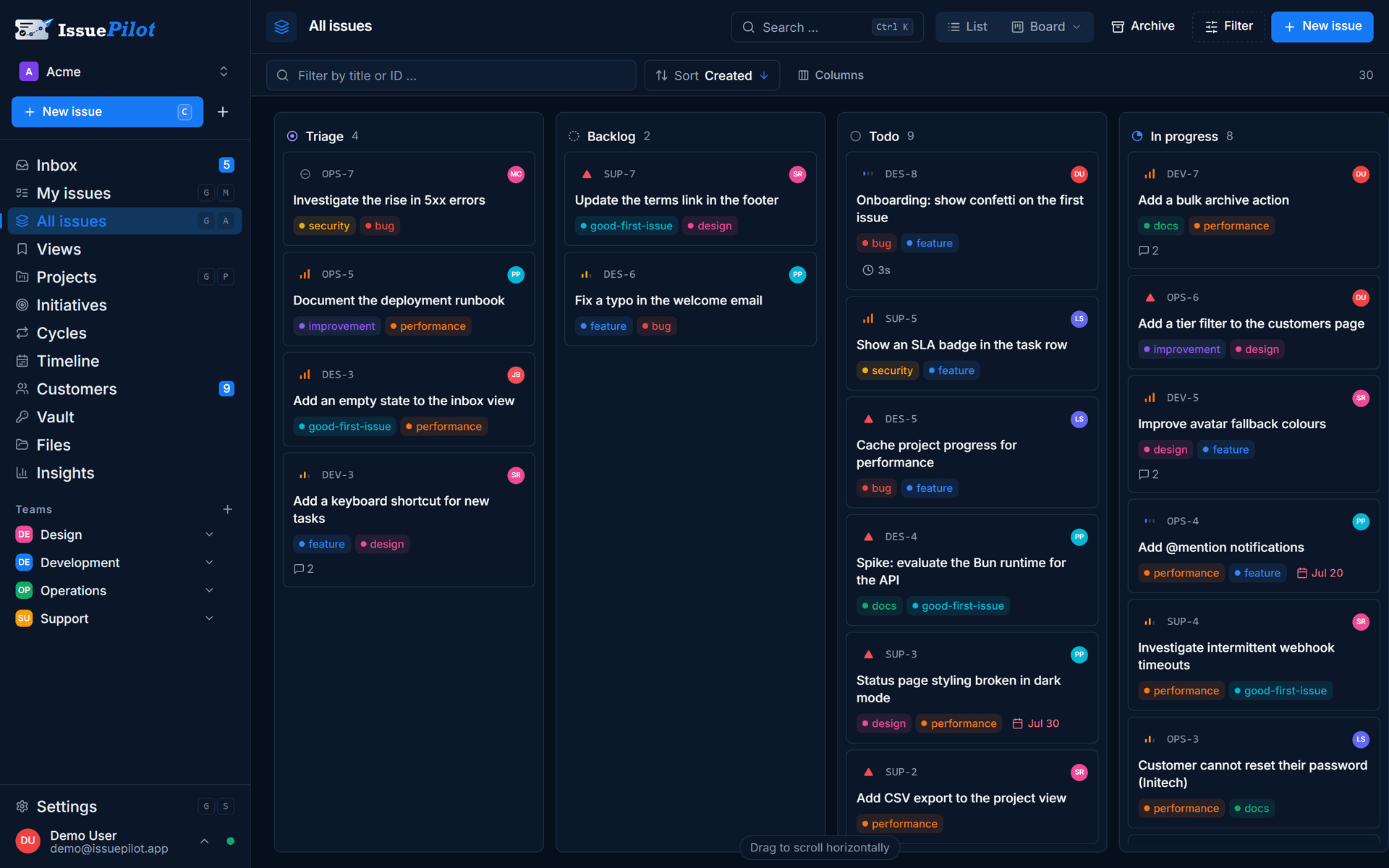
- 1One column per status
- 2Drag to change status
Projects, cycles & milestones
From a single bug to a whole release.
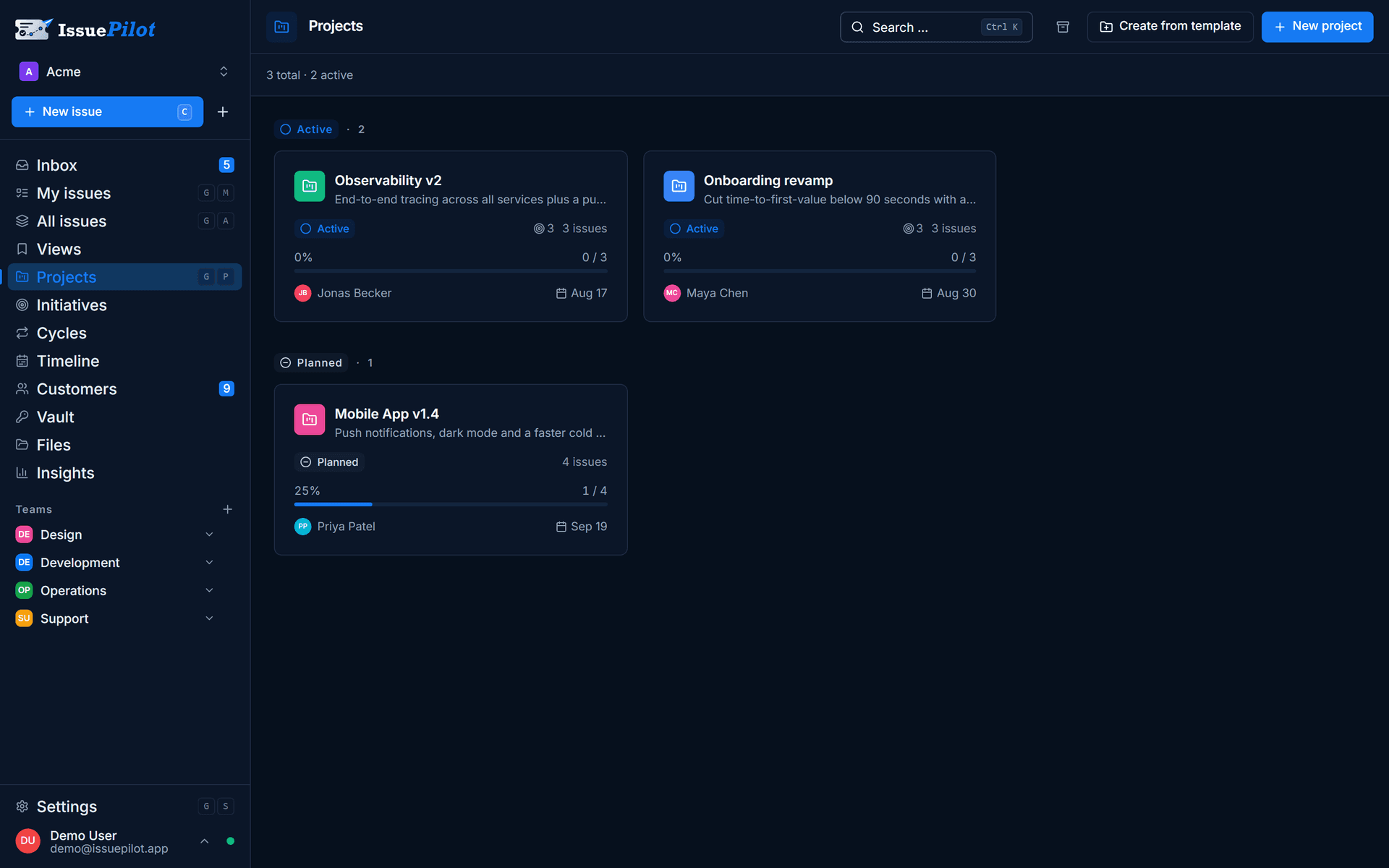
Group related tasks into a project, give the work a rhythm with cycles, and use milestones to mark when things should be done. The progress bar always shows where the project stands.
- Projects gather tasks around a single goal
- Cycles as fixed time boxes for delivery
- Milestones with status: planned, in progress, done
Blockers & relationships
See instantly what's holding up progress.
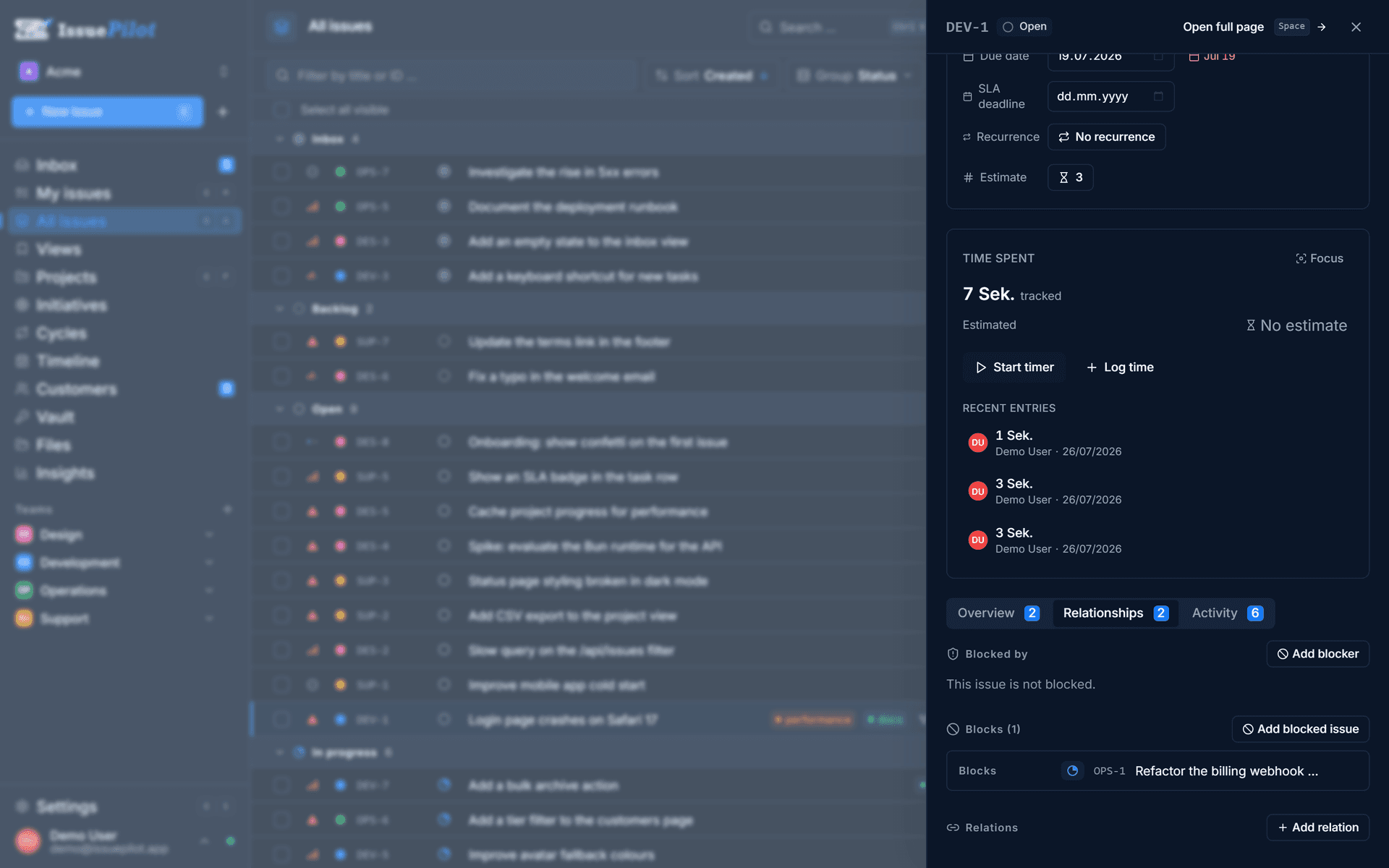
When ISS-481 can only move once ISS-462 is done, you link them as a blocker. IssuePilot shows on every task what is blocking it and what it blocks in turn.
- Blocking relationships between tasks
- Dependencies visible right on the task
- No guessing why something is stuck
Live issue widget
Collect feedback straight from your website.
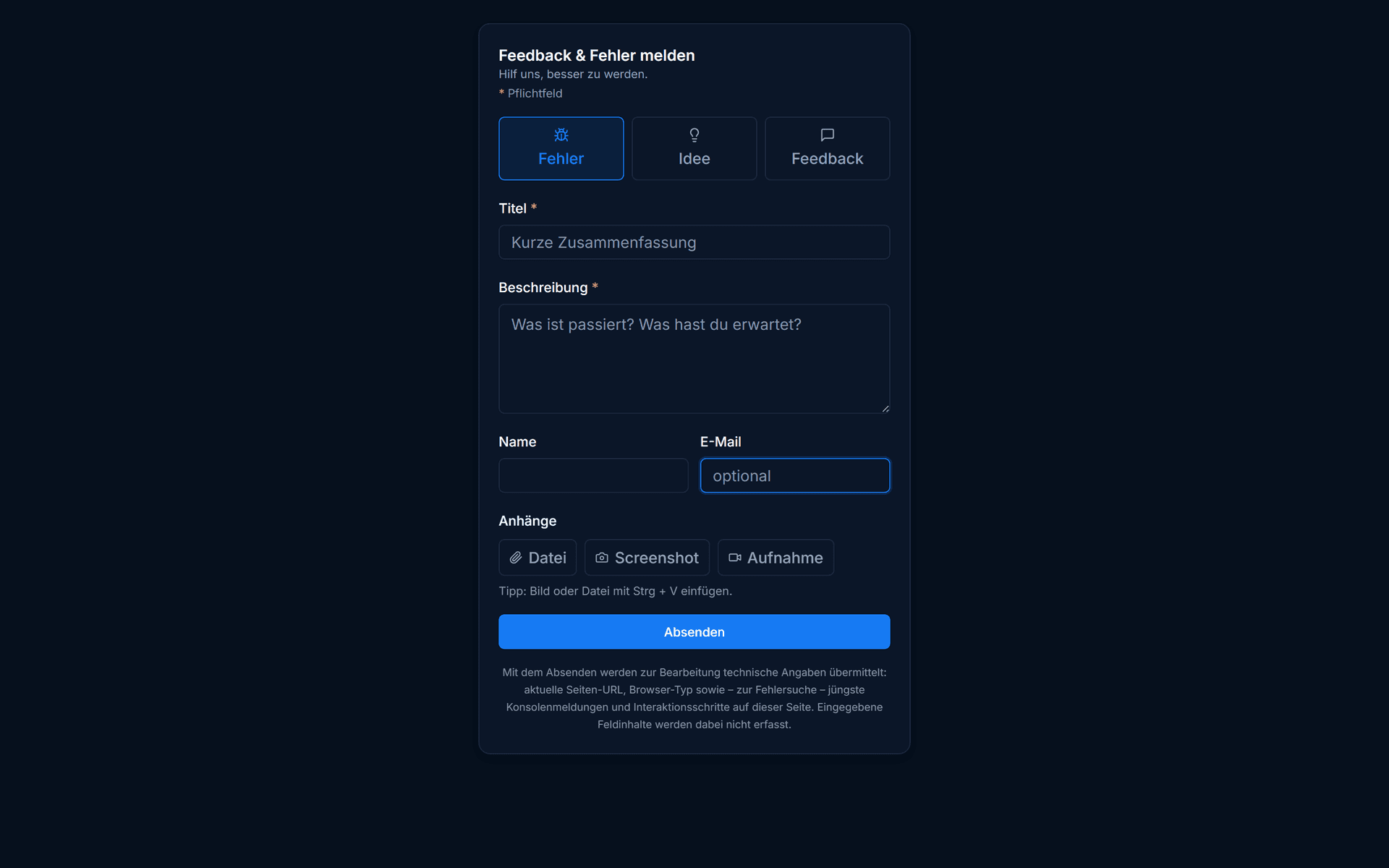
Drop the widget onto your site with a snippet. Users report a bug or an idea, attach a screenshot, and the report lands in the inbox with their email, user ID or customer number.
- Report a bug, idea or question in one click
- Screenshot and extra data come along automatically
- Lands straight in the inbox, ready to triage
Inbox & triage
One inbox for everything that comes in.
Reports from the widget, email or manual entry all come together in the inbox. There you review them, assign them to a project, set a priority and hand them off before they become tasks.
- Widget, email and manual reports in the same inbox
- Review, sort and assign in one step
- Nothing gets lost between mailboxes
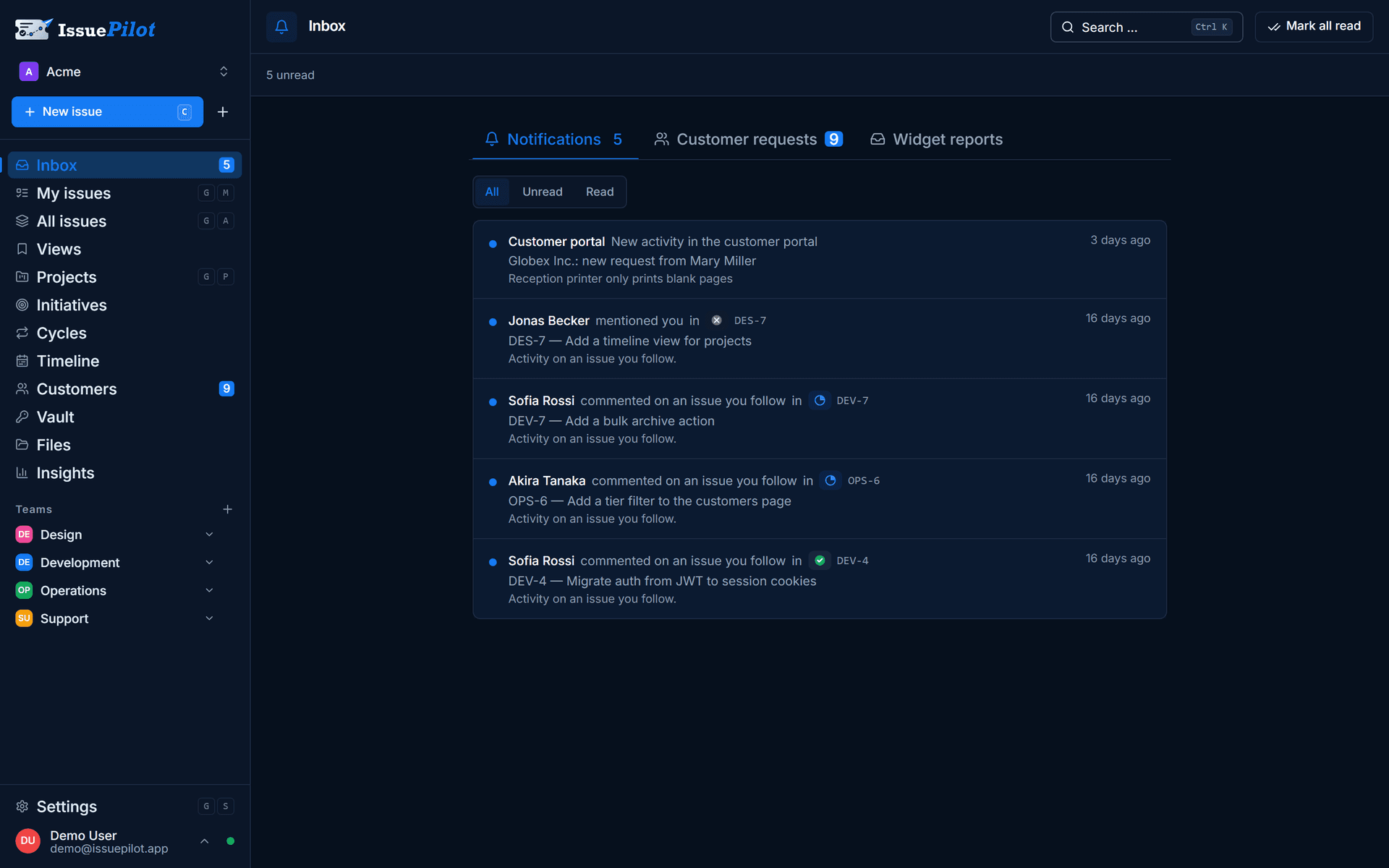
- 1Reports from the portal
- 2Reports from your website
Real time & notifications
Everyone sees the same state, instantly.
When someone changes a status or writes a comment, the view updates for everyone on the team. Web push tells you when something is assigned to you or a task is waiting on you.
- Statuses, comments and fields update live
- Web push notifications in the browser
- No reloads and no stale state
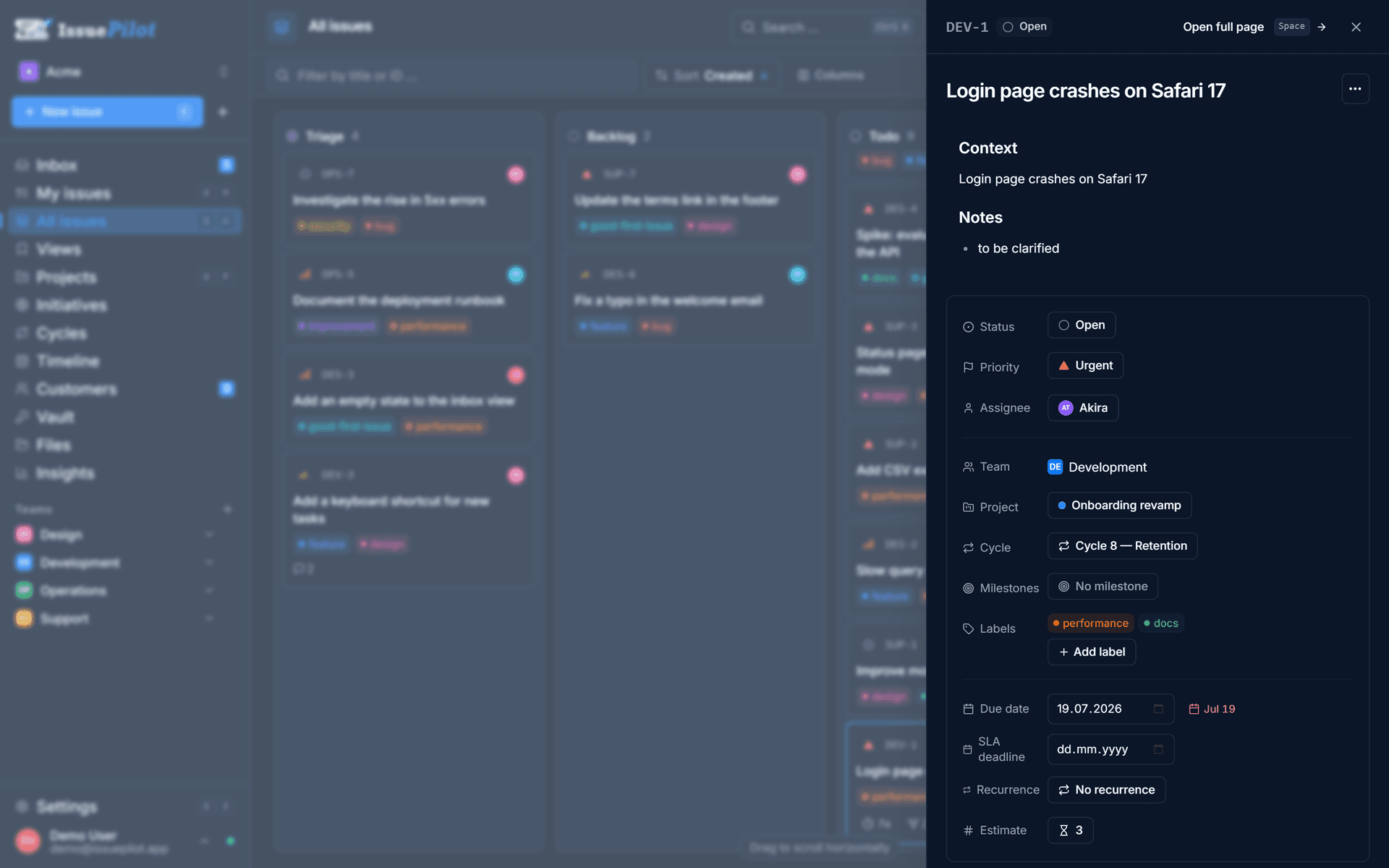
- 1Priority
- 2Belongs to a cycle
Who it's for
Built for agencies, software teams, product teams and support.
Agencies & web teams
Collect bugs, change requests and feedback straight from client websites and turn them into tasks for your team.
Learn moreSoftware teams
Plan bugs, features and technical work, spot blockers and stay on top of what matters in the current cycle.
Learn moreProduct teams
Connect feedback, tasks, projects and milestones in a single system.
Learn moreSupport & QA
Capture issues, add context and route them to the right people.
Learn moreWhy IssuePilot
Not another tool that needs weeks of setup first.
Many issue trackers demand a configuration project before the first task even exists. IssuePilot is usable the moment you sign up: create tasks, collect feedback through the widget, see blockers. You add projects and cycles once your team needs them.
Honestly
What IssuePilot isn't built for.
Four things we can't do. If any of them is a hard requirement for you, save yourself the signup — you'll be better served elsewhere.
No GitHub, GitLab or Slack integration
Commits and pull requests don't attach themselves to a task, and there is no Slack bot.
No SSO, no SCIM
Sign-in is email and password. If you need central user provisioning, you need a different tool.
No freely configurable workflows
Statuses, fields and flow are fixed. That's why you start in 15 minutes — and the price you pay for it.
No AI in the product
No automatic summaries, no suggestions, no model-driven prioritisation. You can connect your own — IssuePilot doesn't think for itself.
If you strictly need one of these, save yourself the 30 days — Jira is the better choice. We wrote down the honest comparison. When Jira is better
Privacy & hosting
Your data stays in Germany.
For agencies, support teams and anyone handling client data, where information is stored matters. With IssuePilot, it's unambiguous.
Servers in Germany
All data is stored on servers in Germany. Nothing moves to a US cloud, and you always know exactly where your team's work lives.
GDPR from day one
No tracking without your consent, processing under the GDPR, and a data processing agreement on request. Privacy is built in, not an add-on.
From Germany, and reachable
Built and operated by a team in Germany. Your questions are answered by someone who knows the product — usually the same business day.
Pricing
30 days of Pro first. Then you decide.
The free plan is enough for a small team long term. When you outgrow it, Pro lifts the limits and unlocks every feature.
Every new account starts with 30 days of Pro for free — all features, no credit card. After that it automatically continues on the free plan: no forced downgrade, no data loss.
Free
For small teams that want to start right away.
- 1 workspace, up to 3 members
- Up to 100 tasks
- Projects, board & list
- Inbox, comments & time tracking
Pro
Everything, no limits — for teams that use every feature.
- Unlimited tasks, up to 50 members
- Releases, cycles, roadmap & timeline
- Customers, requests & attachments
- Insights & multiple workspaces
Both buttons lead to the same signup. Every new account starts with 30 days of Pro — if you want to stay on Free, just let it run out.
Whatever the plan: billing and servers in Germany, GDPR-compliant.
Before you click
What happens when you press the button.
The button takes you to cockpit.issuepilot.app, where the app runs. So you know what you're getting into, here's what's on the other side.
- 1
Three fields
No credit card, no company details, no phone number. Under a minute.
- 2
Your workspace exists
You land straight inside. No setup project, no scheduling call, no sales pitch.
- 3
30 days with every Pro feature
Board, cycles, releases, customer portal, widget, insights — all open, no payment details.
And after that?
Day 1
Account is live, every Pro feature open.
Day 30
The trial ends. There's nothing to cancel, because nothing was started.
Day 31 onwards
Your workspace continues on the free plan. Tasks, projects and comments stay.
What does not happen
- No credit card and no payment details — not now, not after 30 days.
- No automatic subscription. Pro only starts when you book it yourself.
- No phone call and no sales team. There isn't one.
- Not a one-way street: you can export your data at any time.
Still got a question? Write it down
Who's behind it
If something breaks, you write to me.
IssuePilot is built and run by Schneider & Liska GbR in Eppelheim, Germany — no corporation, no call centre, no ticket maze. Write, and you get an answer from someone who knows the code.
IssuePilot is young. We have no customer logos to hang here, and we don't invent any. What you can verify instead: the changelog, the roadmap — what IssuePilot can't do. All public, all dated.
Yannick Schneider
Schneider & Liska GbR · 69214 Eppelheim
usually answered within one business day
FAQ
What teams want to know before they start.
Still have a question? Explore the product or talk to us.
IssuePilot is task, issue and project management software with a built-in live issue widget. Teams capture bugs, tasks and customer feedback in one place, triage them in the inbox and get them done on a board or in a list — from the first report all the way to release. IssuePilot is GDPR-compliant and built for small and mid-sized teams.
Short path
What question is still holding you back?
Write it down. You'll get an answer from a real person, usually within one business day — no sales call, no callback, no newsletter.
Try it for 30 days.
Every new account starts with every Pro feature and no payment details. After 30 days your workspace continues on the free plan – you don't have to do anything and you lose nothing.
Three fields · No credit card · Cancel monthly
- Servers in Germany
- GDPR-compliant
- Built in Germany
Still got a question? Write it down